Click here for a
Chart Comparing Features and Ratings
This review considers which iOS (iPhone, iPad) email clients are best for Gmail. I am a huge fan of Gmail. I consider it the best free email platform. I am also a huge fan of the iOS ecosystem. I will confess I have not had a lot of experience with Android. This review does not consider other email systems such as Exchange, Yahoo Mail, Comcast email, etc. except in assigning a rating to multiple email accounts. I do rate the ability for the apps to add non Gmail accounts for this feature only. Here are the candidates:
Features Compared:
Boxer
Boxer was an early alternative to the default Mail app. Readability is excellent. Other than Apple’s Mail app, this is the only other app to support dynamic type support. Swipe actions are also excellent. Other than Mail and Mailbox, Boxer is the only other app to support customizable long and short swipes. Like Mailbox, Boxer allows you to move emails to “To-Do” folders. If you only check your email through Boxer, this may hold an appeal but if you are like me and use other email clients on different devices I don’t find this to be a helpful feature.
Attachment support is average. If text size is important, Boxer is a better alternative than Apple’s Mail. But it will set you back $4.99 in the app store.
CloudMagic


CloudMagic excels at attachments, readability and search. Unlike the other apps, Google Drive apps open directly in the app. Other attachments open smoothly and quickly. Search is fast and accurate and highlights search terms in the results. Emails with smaller fonts can be tapped and opened for better viewing. Adding attachment to composed emails offer Google Drive integration. Emails can be pinched and zoomed.
Swipe actions are a bit different. Once you swipe you can choose delete, archive or mark as unread. So, to delete you can to swipe and tap. There are no customizations for swipe actions. If you want unlimited email accounts you have to upgrade to pro version. You can view multiple accounts in a combined inbox.
CloudMagic’s biggest weakness, for me at least, is stability. I have experienced numerous crashes. After the app crashes you have to watch old emails reload.
Gmail (by Google)


Gmail from Google is a worthy contender. Search is fast and accurate. Google Drive attachments launch directly in the appropriate native Google Drive app. You can attach Google Drive documents directly to composted emails. Readability is a weakness. Emails written is small fonts stay small. No pinch and zoom is available.
Swipe actions are archive only and are not customizable. You can only setup Gmail accounts and you cannot see multiple configured accounts in one inbox.
Inbox (by Google)
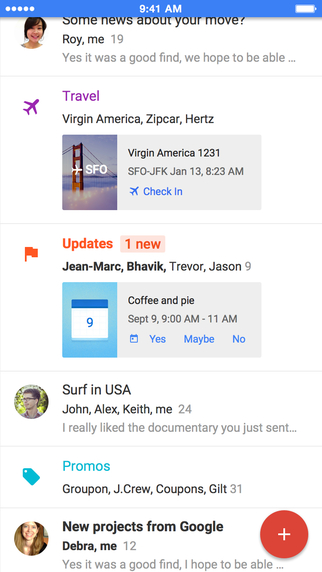

Inbox is Gmail’s new app that aims to organize your emails by predefined categories. It is most unlike any of the other apps in this review in presentation and function. I have been using it off and on almost since it was release. And to use Inbox you have to email Google to get an invite.
Search not only brings up the search term highlighted in yellow but categorizes results by contacts and all other results. Inbox is one of the few apps that links calendar invites directly to the Google Calendar app which is one of my favorite calendar apps these days. Swipe actions are not customizable and allow for swipe and snooze. You can customize the times for the snooze settings. Attachments are a mixed bag. You would think with tight Google Apps integration you could attach a Google Doc directly or a calendar invite; but neither is available in Inbox.
Overall, Inbox is tightly integrated with other Google iOS apps but is not as customizable as other apps. In this design approach, Google knows best and if you buy into the system it can be powerful. However, Inbox is not available for Google Apps for Education, Work or Business accounts. I find it is great for dealing with low priority personal emails but when you are looking for that important email it can get lost in the category system leading to a hunt through the multiple categories.
Mail (by Apple)
Apple’s Mail is the old standby that offers the best integration into the iOS world but not necessarily for Gmail.
Readability is aided by pinch and zoom and Dynamic Type makes reading the inbox easy. Swipe actions allow customization and multiple choices upon swiping.
Mail shows its Apple-centric roots with Google Drive attachments (must open a browser, like Outlook) and are hard to attach to a composed email (you must copy and paste the Google Doc URL). In order to setup Google 2 factor authentication you must configure a special code through your Google account. You cannot use the Google Authenticator app or have a code texted to you.
Mailbox (by Dropbox)


Mailbox’s big feature set is sending emails to custom folders and using them to get your inbox to zero. This is fine if all you use to check your email is this app. But that is rarely the case for most users. So now these custom folders appear in other clients but not as prominently or seamlessly as they do in Mailbox. Swipe is very capable. Short and long swipes left and right perform delete, archive, schedule and put in a custom folder. Readability is supported by pinch and zoom (only after you tap on the email and open it in another view). The default and non customizable font size is small.
Search is capable but does not highlight search terms in results. Attached Google documents open in a web browser. Being a Dropbox product, only direct attachment of Dropbox documents is supported.
Multiple email accounts are supported but only for Gmail and iCloud.
Outlook (by Microsoft)
Microsoft’s new strategy is to embrace more platforms and Outlook for iOS is a very capable email client. Outlooks biggest advantage is integrated calendar support. You can view your Google Calendar within the same app. Although the calendar in Outlook isn’t as full-featured or as well layed out as the Calendar app from Google or other calendar apps, the calendar in Outlook is capable and logically presented. It is one of the few apps that allows you to insert a calendar invitation directly into a composed email.
Outlook also has a built in email filter. Emails are sorted automatically as either “focused” or “other” emails. The feature works well and helps you concentrate on the important emails. Search, like CloudMagic, is fast and highlights search terms in results.
Readability is strong. Fonts are large and easy to read. Pinch and zoom is available. Swipe actions are customizable and logical. You can turn threading off.
Outlook, at least for Google Drive attachments, shows its Microsoft roots. Clicking on a Google Drive attachment forces you to open it in a browser window after forcing you to sign into your Google account. Attaching Google documents is also awkward.
There “files” section seem added on and not fully developed. However, the “people” section is unique and interesting. You can quickly search for emails from selected contacts in this part of the app.
Conclusion:
I have yet to find a perfect iOS email app for Gmail. I use different email apps for different purposes. I find that I am using CloudMagic, Outlook and Inbox the most but for different reasons. Inbox I use to whittle away at personal emails. Outlook is best used when trying to compose an email with calendar attachments or when viewing my calendar quickly. CloudMagic is the overall winner: I can view attachments easily and the swipe actions are sufficient CloudMagic’s biggest drawback is its stability issues and that is it is a freemium product.


